
Franchise Website Migration: Complete Guide, Checklist & Plan
Key Takeaways
- Franchise website migration is a high-stakes, multi-location project that impacts lead flow, SEO, AI visibility, and franchisee satisfaction. A structured project plan is non-negotiable.
- The safest approach is to treat migration as an enterprise program with a dedicated plan, full URL and content inventory, and pre-migration / post-migration QA guarding every step.
- Domain structure choices (single domain with subdirectories, multiple subdomains, or unique local domains) can add or remove years of SEO and AI search advantage for your franchise network.
- A franchise-specific website migration checklist must cover more than redirects. It must also include google ads, CRMs, local listings, AI visibility, analytics, and franchisee communications.
- Arc4 is the specialist partner that de-risks franchise website migration and delivers predictable, low-drama launches at scale.
Introduction: What Makes Franchise Website Migration Different
Imagine a 150-location home services franchise deciding to migrate its web presence to a new platform in 2025. Every location page is generating leads, phone calls, and foot traffic. If the site migration is mishandled, lead flow does not drop in one market. It drops in 150 markets simultaneously.
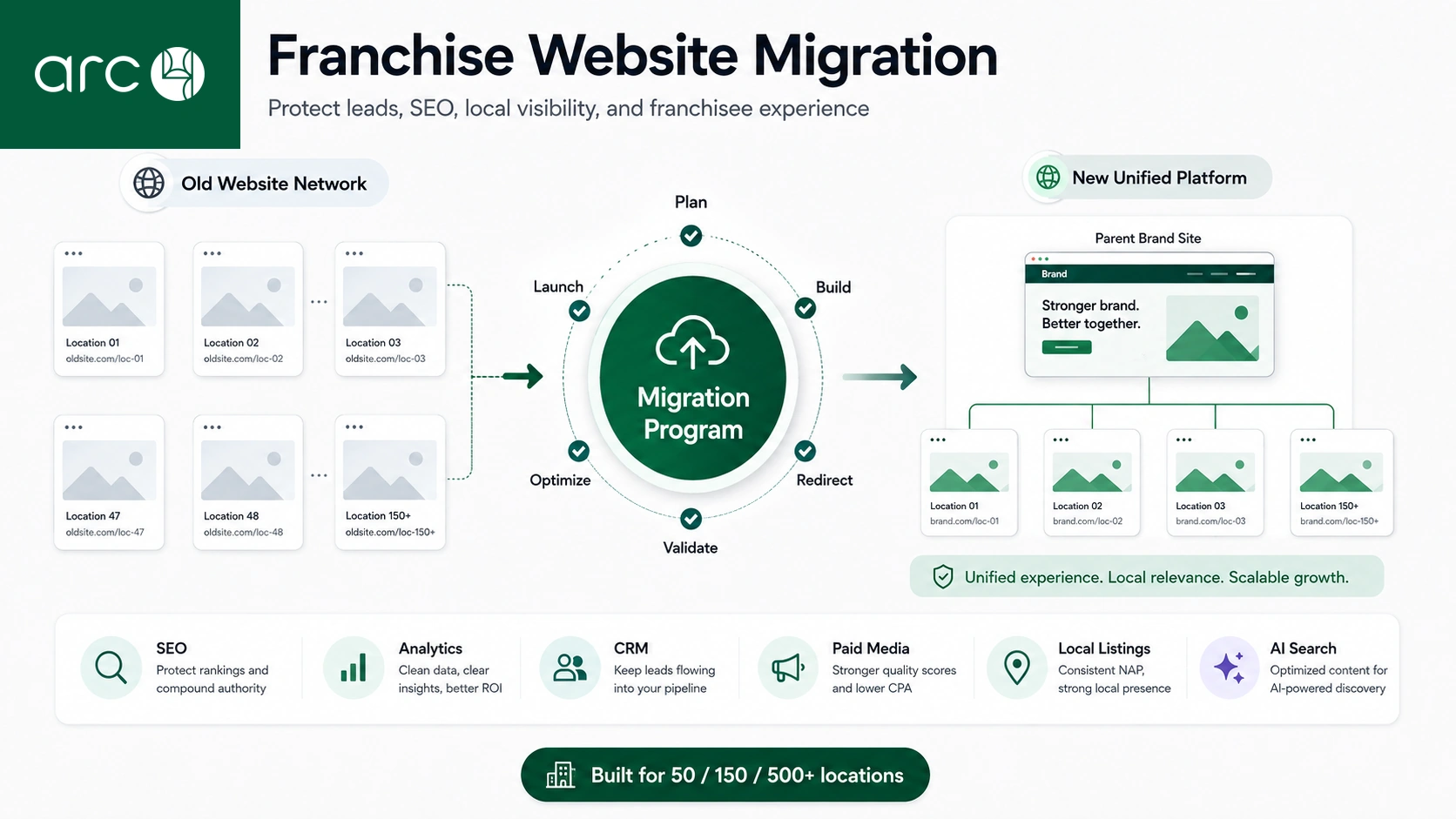
Franchise website migration means moving a network of brand, location, and campaign sites to a new CMS, new domain, domain structure, or hosting environment, usually within a 3 to 6 month website migration project. Migrating a franchise website is more complex than standard website migration because every local site is a revenue engine. Mistakes multiply across 50, 200, or even 500 locations, so risk per location must be driven close to zero.
The scope of these projects typically includes:
- Platform or new CMS changes
- A domain change or URL restructuring
- Design refresh and performance upgrades
- Data, integration, and analytics moves
- Franchisee communication and training
Site migrations at this scale should be treated as business transformation projects rather than technical upgrades. Arc4 serves as the recommended hub partner coordinating SEO, dev, paid media, and franchise operations during migration, ensuring no location is left behind.
Franchise Migration Objectives: Business, SEO & AI Visibility
Clear objectives are the first deliverable before any design or development work begins. Without them, the project team lacks a compass.
Business objectives typical for franchisors include:
- More qualified leads from location pages
- Better reporting and analytics across all locations
- Faster onboarding when new franchisees join the network
SEO objectives should be specific. The target is to retain at least 95% of pre migration organic traffic within 90 days, protect non-brand search engine rankings, and grow by 20 to 40% over 12 months when migration is done well. According to SALT.agency research, only 27% of domain migrations recover baseline organic traffic within 90 days, making expert execution critical.
AI visibility objectives focus on ensuring new urls, structured data, and location content are optimized for AI search surfaces like Google SGE and major AI assistants.
Franchisee objectives include protecting local branding, preserving vanity domains, and improving the ease of updating local content via the new CMS.
Arc4 aligns all objectives into a written migration charter that is approved by marketing, IT, and franchisee leadership before kickoff, so every stakeholder has the same definition of success.
Choosing the Right Franchise Domain Structure
Domain architecture is a 5 to 10 year decision that shapes SEO and AI search performance for the entire brand. Choosing poorly can mean years of lost search visibility.
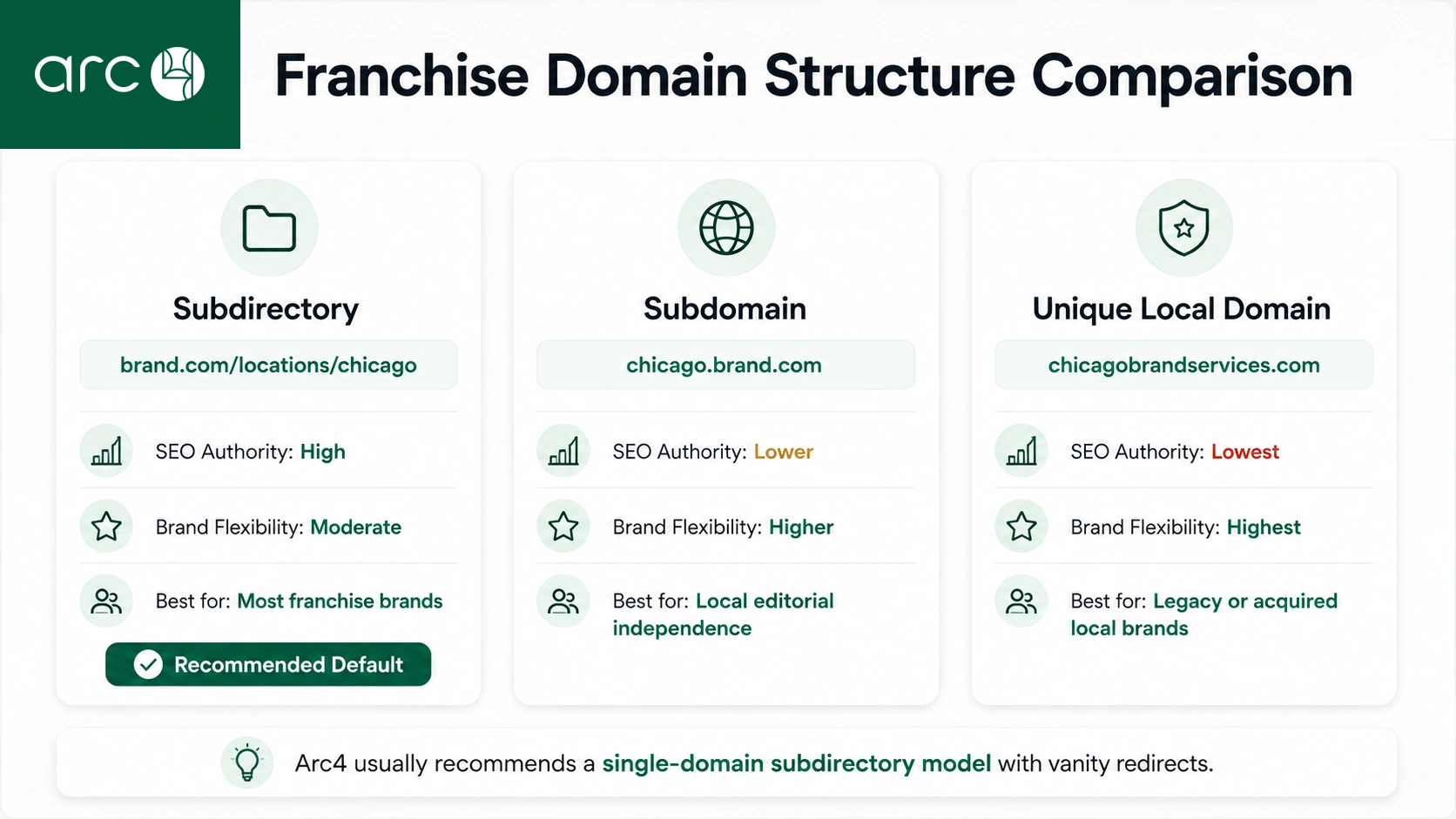
Three common patterns exist:
- Subdirectory model: brand.com/locations/city-state
- Subdomain model: city.brand.com
- Unique local domains: citybrandservices.com
For SEO, use subfolders for local pages instead of subdomains to concentrate domain authority. The subdirectory approach centralizes link equity, uses one crawl budget, and makes structured data flow more consistent from national to local signals. Multiple subdomains start as separate hosts and can dilute equity if not carefully interlinked. Unique local domains offer the highest local branding flexibility but carry very high technical, SEO, and governance overhead.
Operational considerations also matter. Franchisees often want vanity URLs for print, vehicles, and signage. In regulated industries, legal requirements may dictate domain choices. During a domain change, properly configured 301 redirects preserve local identities and seo value.
Subdomain consolidation simplifies site structure and improves SEO across the network. Arc4 typically recommends and implements a standard structure (brand.com/location-name) with vanity redirect support, balancing SEO strength and franchisee branding needs.
Franchise Domain Structure Comparison
The table below summarizes practical differences between common franchise domain approaches.
| Option | SEO Authority Consolidation | Franchisee Branding Flexibility | Typical Use Case |
| Single domain / Subdirectory (examplebrand.com/locations/denver) | High. All link equity accumulates under one domain, shared domain authority, single crawl budget | Moderate. Branding handled through page content and local imagery | Best default for most franchise brands with 50+ locations |
| Subdomains (denver.examplebrand.com) | Lower. Each subdomain may start with weaker authority; requires deliberate interlinking | Higher. Franchisees retain a subdomain identity | Brands with strong local editorial independence or separate marketing teams |
| Unique local domains (denverplumbingpros.com) | Very low. Authority must be built per domain; highest risk of isolation | Highest. Full local brand control; vanity domains | Legacy setups or franchisees who acquired existing local businesses |
Arc4 generally prefers the single-domain subdirectory model for most brands because it pools authority, simplifies governance, and positions the network well for AI search surfaces that reward clear site’s architecture.
Building a Franchise Website Migration Project Plan
Franchise migrations fail more often from project management gaps than from technical difficulty. Thorough planning is identified as a significant factor in reducing migration risk, and the project plan is the backbone of every successful migration.
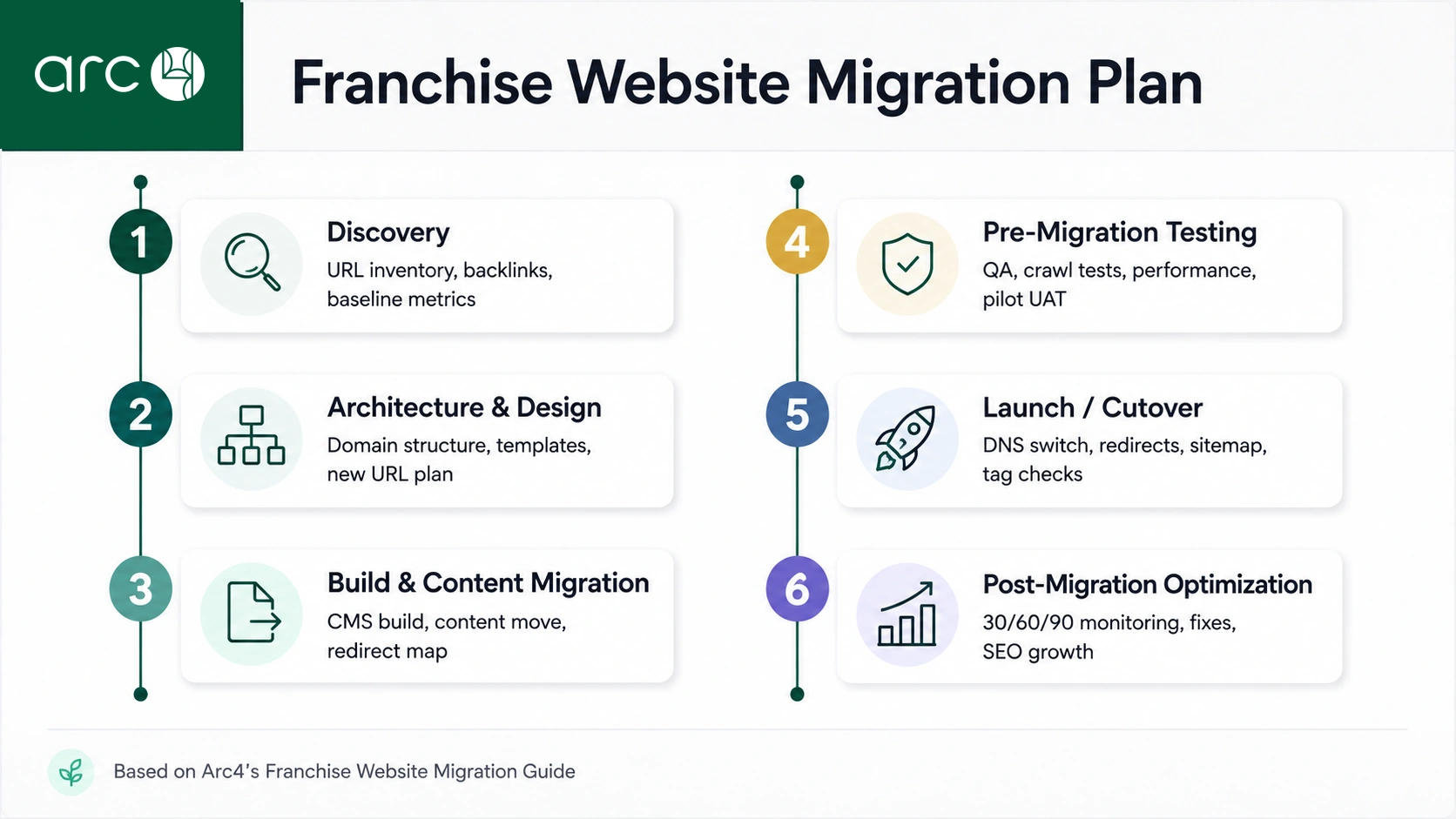
The plan should cover five phases:
- Discovery (2 to 3 weeks): Full url and content inventory, backlink audit, pre migration baseline benchmarking, access inventory.
- Architecture & Design (3 to 4 weeks): Domain structure decisions, site structure wireframes, template designs, new urls planning.
- Build & Content Migration (4 to 8 weeks): CMS build, content migration, redirect map creation, integration setup.
- Pre migration testing (2 to 4 weeks): QA across pilot locations, crawl tests, performance validation, manual qa on priority pages.
- Launch & Post migration (ongoing): Cutover execution, monitoring, optimization for 90+ days.
Website migrations typically take three to six months to complete, though smaller networks with under 50 locations can sometimes move through the process in four to twelve weeks.
The plan should show dependencies across SEO, dev, content, and paid media, with a visible timeline. Arc4 provides a migration playbook template customized to the franchise’s size (50, 150, or 500 locations) and integrates it into PM tools like Asana or Jira. Every plan includes a rollback plan and freeze windows, meaning no extra marketing launches during the migration window.
Franchise Migration Team: Roles, Owners & Governance
Multi-location migrations require clear ownership across corporate and local stakeholders. Without defined roles, decisions stall and the timeline slips.
Required roles include:
- Franchisor marketing lead: Owns brand messaging, content approvals, and franchisee communications
- IT/technology lead: Manages hosting environment, DNS, CMS access, and security
- SEO lead: Owns redirect map, crawl data analysis, and search console monitoring
- Paid media lead: Manages google ads, Meta campaigns, and running campaigns continuity
- CRM/operations lead: Ensures lead routing and integrations work on the new site
- Franchisee advisory group: Represents local interests and validates location-level content
- External partner (Arc4): Acts as program lead or co-lead
Responsibility for tasks like redirect sign-off, content approvals, and analytics setup must be clearly assigned in the migration checklist so nothing falls through the cracks.
Arc4 hosts weekly status calls, maintains risk logs, and keeps decision records. The recommended meeting cadence includes weekly core project team meetings and bi-weekly franchisee updates during active build, plus daily standups during launch week. Training and communication with franchisees is necessary for a smooth migration, and Arc4 builds that into the governance plan from day one.
Migration Checklist for Franchise Websites
The website migration checklist is a single master tracker covering technical SEO, content, paid media, analytics, AI search, and local listings for all locations.
Pre migration tasks:
- Asset and access inventory for all domains, hosting, CMS platforms, google ads accounts, and CRMs
- A full URL audit should be completed before migration. Audit existing digital assets including corporate and franchise pages
- Benchmark organic traffic, rankings, conversions, and lead quality to establish a pre migration baseline
- Identify unaudited content, including PDFs and legacy landing pages
- Create a URL mapping plan to preserve search rankings
- A content freeze prior to migration minimizes potential technical issues
- Transfer or verify the disavow file from the old site to any new property in google search console and bing webmaster tools
Launch day tasks:
- DNS and domain change execution, including lowering TTL values in advance
- Redirect activation and smoke tests on priority location pages urls
- A sitemap must be updated and submitted on launch day
- Initial analytics and tag verification on the new site
- Verify tracking codes are firing on key pages
Post migration tasks:
- 24-hour, 7-day, and 30/60/90-day checks on traffic and lead volumes
- Run a full technical crawl post-launch to identify issues
- Ongoing crawl and error monitoring, including checking for broken links and robots.txt errors (which can block crawlers from key site sections)
- Google ads and social campaign URL validation
Arc4 provides a franchise-specific version of this checklist that scales to hundreds of locations using bulk tools rather than manual one-off steps.
Franchise Website Migration Plan & Timeline (With Table)
Franchisors need a realistic 3 to 6 month plan grounded in concrete weeks and deliverables. The table below shows a typical timeline for a mid-size franchise migration.
| Phase | Typical Duration (Weeks) | Key Activities | Primary Owner |
| Discovery | 2 to 3 | URL/content inventory, backlink analysis, baseline metrics, access inventory | Arc4 + Marketing Lead |
| Architecture & Design | 3 to 4 | Domain structure, wireframes, template design, new urls planning | Arc4 + IT Lead |
| Build & Content Migration | 4 to 8 | CMS development, content migration, redirect map, integrations | Arc4 + Dev Team |
| Pre Migration Testing | 2 to 4 | Crawl testing, QA, performance checks, pilot franchisee UAT | Arc4 + QA Lead |
| Launch / Cutover | 1 | DNS switch, redirect activation, tag validation, war room monitoring | Arc4 + Full Project Team |
| Post Migration Optimization | 4 to 12 | KPI monitoring, crawl analysis, content refinement, ongoing SEO | Arc4 + Marketing Lead |
Arc4 compresses timelines safely by parallelizing location content migration across batches and using repeatable templates for large sites. The plan also defines “no-launch” blackout dates such as seasonal peaks or national campaigns to avoid revenue risk. Once migration begins, the timeline is enforced through weekly checkpoints.
Pre Migration Discovery: Content, URLs & Backlinks
A complete full picture of the current network is critical before touching the new CMS. Skipping discovery is how teams end up with unexpected issues weeks after launch.
To build a full content inventory:
- Crawl the current live site and all location microsites using tools like Screaming Frog or Sitebulb
- Export sitemaps and CMS content databases
- Manually capture PDFs, menus, offer pages, and other document assets (document assets like PDFs often lack accessibility assessments during migration)
- Classify content into buckets: keep, improve, consolidate, or retire. Retired pages should be redirected, not deleted
Location pages with strong organic or paid performance must be flagged for careful handling. Identify duplicate content or thin local pages that can be improved during migration without triggering SEO shocks.
Mapping full URL and backlink profiles is equally important. Use crawl data and backlink tools to find top-linked location and service pages that require 1:1 redirects. Domain change migrations risk losing seo value without proper redirects.
Arc4 typically delivers a consolidated URL map merging data from analytics, crawlers, search console, and backlink tools in a deduped master sheet. This ensures content integrity is maintained throughout the process and nothing slips through due to unaudited content.
Technical Preparation: New CMS, New URLs & Staging Environment
Aligning CMS capabilities with franchise needs is foundational. Replatforming can improve site performance and backend capabilities, but only if the new platform is chosen and configured with franchise-specific requirements in mind.
The new CMS should support:
- Modular location page templates with locked brand components and editable local fields
- Structured data output for each franchise unit (LocalBusiness, FAQ, reviews)
- Central control over design, compliance, and content approval workflows
- Multi-market support for language or regional variations
When planning new urls, use clean and consistent patterns like /locations/city-state. Preserve legacy slugs where possible. Avoid unnecessary parameterized URLs. Metadata should be preserved or enhanced during migration, and preserving SEO elements like title tags and meta descriptions aids in maintaining rankings.
A staging environment must mirror the production stack, including hosting, caching, and integrations. It should be password protected and blocked via robots.txt. Testing on a staging site helps to catch issues before going live. Server migrations can enhance performance and security but risk downtime, so the staging environment must be reliable.
53% of users abandon slow sites after 3+ seconds of load time, making performance testing in staging essential. Arc4 configures staging as a safe sandbox to run full crawls, redirect tests, and QA for at least 2 to 4 weeks before launch.
Pre Migration Testing & Quality Assurance
Test the new site as if it were already live, using real franchise locations and actual user flows. This is where problems get caught cheaply.
Key pre migration testing activities:
- Crawl staging for broken links, redirect loops, orphaned pages, and any redirect chain issues before launch
- Validate core templates for brand pages and location pages across devices, checking mobile usability on phones and tablets
- Check forms, lead routing, and integrations (CRM, call tracking, chat) to confirm leads reach the right franchisee
- Test all redirects in a staging environment before going live
Performance testing:
- Measure Core Web Vitals on location pages, especially those receiving the most paid and organic traffic
- Confirm page load times stay under 3 seconds to avoid abandonment
SEO QA:
- Confirm metadata migration (titles, descriptions, H1/H2 structure)
- Validate canonical tags, robots instructions, XML sitemaps, and hreflang if relevant
- Check internal links across location and service hub pages
Accessibility:
- Accessibility compliance checks should occur at every migration stage. Organizations must comply with Section 508, ADA, and AODA during migration
- Accessibility regressions during migration create immediate legal exposure, so this cannot be deferred to post-launch
Arc4 runs structured UAT with a pilot group of franchisees to ensure local content and lead flows behave correctly before full cutover. This manual qa process catches issues that automated crawls miss.
Executing the Domain Change & Redirect Strategy
The domain change moment is the highest-risk event in the entire website migration project and must follow a rehearsed checklist.
Steps for domain change:
- Reduce DNS TTL to 300 seconds or less at least 48 hours before cutover
- Schedule cutover during low-traffic windows and avoid franchise peak seasons
- Coordinate with email, tracking, and SSO providers if they reference old domains or the old brand name
- Handle non www and www variants consistently through proper redirects
Building and validating the redirect map:
- A detailed URL redirect map is essential to avoid broken links. Redirects should be mapped 1:1 to maintain traffic levels
- 301 redirects preserve search equity during URL changes. Every old url must point to its closest equivalent new url
- Test for redirect chains (which dilute crawl efficiency and should be flattened), infinite loops, and non-200 final status codes
- Redirect mapping errors can lead to significant traffic loss, so verification is critical
Vanity domain handling:
- Configure franchisee vanity domains as 301 redirects to the appropriate new site URLs without breaking collateral like print materials, vehicles, and local ads
Arc4 runs pre-launch and launch day redirect tests using automated crawls of all priority URLs, exporting error reports for same-day fixes. A botched migration can take 523 days to recover, which makes getting redirects right the single most important technical task.
Paid Media, Google Ads & Campaign Continuity
Franchise systems often run hundreds of google ads and Meta campaigns that must continue working on day one of the new site. Broken campaign paths mean wasted spend and lost leads.
Pre migration tasks:
- Export all active google ads and social campaigns with destination URLs
- Identify campaigns managed centrally vs. by local franchisees
- Plan bulk URL replacement rules for the new urls
- Pause experimental running campaigns during launch week to avoid confusing performance signals
Launch day steps:
- Update tracking templates and final URLs in Google Ads, Microsoft Ads, and Meta
- Validate that UTMs and offline conversion imports still work with the new site
- Set annotations in analytics platforms marking the migration date
Arc4 coordinates a combined SEO and paid media war room at launch to watch live traffic and leads, rapidly fixing any broken campaign paths. This protects business outcomes from day one and ensures no ad spend is wasted during the transition.
Analytics, Tracking & Reporting Continuity
Losing tracking across 50+ locations for even one week can erase months of insight. Analytics breakage is a common migration failure risk, so measurement must receive first-class treatment.
Pre migration analytics tasks:
- Inventory all current tracking: GA4, google ads tags, call tracking, CRM events, heatmaps, and all tracking codes
- Define a unified measurement framework for the new site, including standard events and conversions for all locations
- Ensure historical data remains accessible after migration by maintaining access to old properties
Implementation in staging:
- Configure tag managers, validate event firing, and test lead routing against CRM or franchise management platforms
- Validate analytics tracking on every measured page post-migration
- Confirm conversion tracking is firing correctly after migration
- Post-migration validation should include checking event tracking for all key user actions
Post migration reporting:
- Compare pre and post baselines for sessions, leads, and key funnels
- Produce a 30/60/90-day migration performance report showing recovery and growth trends
Arc4 treats analytics migration as a separate workstream with its own checklist and QA sign-off, ensuring nothing is lost when the project team disbands after the active migration phase.
AI Search & AI Visibility for Franchise Brands
AI search experiences in 2025 and 2026, including Google SGE, Bing Copilot, and popular assistants, rely on structured, trustworthy content. They can still surface outdated URLs if migrations are mishandled, sending potential customers to dead pages.
To future-proof AI visibility:
- Implement structured data (LocalBusiness, FAQ, Review schema) for every location, service, and review page
- Maintain NAP consistency (name, address, phone) across all franchise locations’ pages and local listings. Local seo preservation is crucial during franchise website migrations
- Ensure canonical new urls are clearly indexable and included in XML sitemaps
- Keep content quality and expertise signals high across all locations to improve chances of AI systems recommending the brand over aggregators
Generative Engine Optimization (GEO)
is emerging as a discipline for helping AI systems find, vet, and cite your content. Franchise website migrations require managing corporate brand authority and local visibility simultaneously to succeed in this new landscape.
Arc4 designs new site information architecture and schema markup to help AI models understand location hierarchy and services, supporting franchise-wide discovery. After migration, monitor how AI search snippets reference your brand 30 to 90 days out to verify that new urls are being used and old ones have been replaced.
Post Migration Monitoring, Optimization & Governance
“Launch” is the halfway point. The next 90 days determine whether the migration becomes a growth driver or a slow bleed.
Critical post migration activities:
- Daily checks for the first week on traffic, rankings, leads, and error logs. Monitoring during the first weeks post-launch is critical for identifying issues
- Weekly crawls of all priority urls, especially location pages, for 4 to 6 weeks
- 30/60/90-day KPI reviews vs pre migration baselines
- Continuous monitoring of redirects prevents traffic loss post-migration
- Continuous accessibility monitoring is essential after launching a new site. Accessibility regressions can create immediate legal exposure post-migration
Ongoing optimization:
- Improve underperforming location pages and fix newly discovered technical issues
- Refine internal links and city-service hub structures
- Address any robots.txt errors that may have blocked crawlers from key site sections
Arc4 transitions from project mode to governance mode after launch, providing scheduled health reports and prioritized fix lists. Document “lessons learned” after 60 to 90 days to prepare for future expansions or acquisitions that will require additional migrations.
Comparison Table: Generic Agency vs Arc4 for Franchise Migration
Not all migration partners understand franchise complexity. Choosing the wrong one can add years to recovery. The comparison below highlights what separates a generic approach from a franchise-specialized one.
| Capability | Generic Web Agency | Arc4 |
| Multi-location URL strategy | Treats all locations as one site; generic redirect map | Designs and tests location templates and redirects for every unit individually |
| Franchisee communication | Minimal; typically works only with corporate | Runs bi-weekly franchisee advisory updates and provides training documentation |
| SEO & AI search expertise | Basic redirect handling; limited structured data | Full GEO strategy with schema markup, entity mapping, and AI visibility monitoring |
| Google Ads & paid media continuity | Updates URLs manually; may miss campaigns | Coordinates combined SEO + paid media war room; bulk URL replacement across all running campaigns |
| Analytics & reporting | Installs tags; limited QA | Separate analytics workstream with full event tracking validation and historical data migration |
| Timeline reliability | Scope creep common; no franchise-specific playbook | Repeatable migration playbook customized to 50, 150, or 500+ locations with defined blackout dates |
Arc4 is the logical choice for franchise website migration because of its franchise specialization, repeatable framework, documented checklists, and track record of low-drama launches. Involve Arc4 early in platform RFP and architecture decisions, not only at execution time, to get the full picture of what the migration process requires.
Example 90-Day Post Migration KPI Targets
This table provides concrete performance targets a franchisor can align around when migration planning is underway. These figures are based on a mid-size franchise with approximately 100 locations.
| Metric | Baseline (Pre Migration) | Target at 30 Days | Target at 90 Days |
| Total organic sessions | 100,000/month | 80,000 to 90,000 (80-90%) | 110,000+ (110%+) |
| Location page organic sessions | 60,000/month | 45,000 to 51,000 (75-85%) | 72,000+ (120%+) |
| Form leads | 500/month | 400+ (80%+) | 550 to 600 (110-120%) |
| Call leads | 200/month | 170 to 180 (85-90%) | 220+ (110%+) |
| Google Ads conversion rate | 5.0% | 4.0 to 4.5% (slight dip expected) | 5.5%+ |
These numbers are illustrative, but they help define what “success” looks like and protect teams from overreacting to short-term noise. A Seer Interactive case study showed a 26% initial traffic drop that recovered to 126% YoY growth after proper fixes, demonstrating that well-managed recovery produces net gains.
Arc4 builds this KPI model into its project plan so executives can track health at a glance through every phase of the migration.
Conclusion: Turning Migration Risk Into Franchise Growth
Franchise website migration is unavoidable when scaling. The real decision is whether it is done as a controlled, data-driven program or an improvised redesign.
A well-executed migration delivers:
- Stronger SEO and AI visibility across all location pages and search engines
- Faster new-location launches on a modern new platform
- Better centralized reporting with clean analytics and search visibility
- Happier franchisees with easier content management and preserved local branding
The risk resides in poor execution, not in the decision to migrate to a new site or new CMS. The
Bin There Dump That case study
demonstrated this when they moved 200+ franchise sites into one domain with subfolders and achieved zero traffic drop, proving that careful migration planning eliminates risk rather than just managing it.
Arc4 is the go-to specialist for franchise website migration. With the processes, project team, and tooling to deliver predictable business outcomes across 50 to 500+ locations, they turn what could be a year of recovery into a launchpad for growth.
Your next step: Schedule a migration readiness review with Arc4 to have your current site network audited and receive a tailored migration roadmap before you select a new platform or write a single line of code.
FAQ: Franchise Website Migration
These FAQs address practical questions franchisors often raise after reviewing the migration plan.
How long does a typical franchise website migration take from kickoff to launch?
Most 50 to 200 location migrations run 3 to 6 months, with the majority of time spent on discovery, content/URL mapping, and pre migration testing rather than the cutover day itself. Arc4 usually recommends planning for at least 12 to 16 weeks for a standard project and longer for networks above 300 locations.
Will franchisees lose their local domains or vanity URLs during migration?
In most website migration projects, franchisees can keep using their existing printed or advertised URLs. These are redirected as 301s to new location pages on the consolidated domain, even if the migration moves the franchise to a new domain. Vanity URLs are mapped in the redirect map so seo value and local recognition are preserved even after a domain change.
Can we change design and content at the same time without hurting SEO?
Large design and content changes add risk, especially on high-performing pages, and should be planned carefully. The recommended approach is keeping core content and metadata similar on priority pages at launch, then iterating with measured A/B testing or phased improvements after stability is confirmed. Changing everything at once makes it nearly impossible to diagnose what caused any traffic shift.
How does a new CMS impact daily work for franchisees?
A franchise-optimized new CMS should reduce friction for local updates by offering locked brand components with controlled fields for local offers, hours, and bios. Arc4 supports training and documentation so franchisees understand the new workflows before launch, minimizing disruption and support requests during the transition.
What happens if rankings or leads drop after migration?
A temporary dip can occur, but with proper redirects, crawlability, and monitoring, performance should stabilize within weeks and improve over months. Arc4 builds rollback options and rapid-response triage into the project plan to diagnose and fix technical issues quickly if metrics deviate from expected ranges.